6 Outlet Power Strip with USB-A and USB-C: One Strip for Work and Charging
Modern workspaces rely on more connected devices than ever. Computers, monitors, desk lamps, smartphones, tablets, and other accessories all need convenient access to power. A 6-outlet power strip with USB-A and USB-C helps bring these everyday power needs together in one practical location. Designed around six AC outlets and built-in USB charging ports, this type […]
Modern workspaces rely on more connected devices than ever. Computers, monitors, desk lamps, smartphones, tablets, and other accessories all need convenient access to power. A 6-outlet power strip with USB-A and USB-C helps bring these everyday power needs together in one practical location.
Designed around six AC outlets and built-in USB charging ports, this type of power strip supports a more organized setup for home offices, desks, and other indoor work areas. With a clearly defined electrical rating of up to 15A / 1875W for AC power, it offers a straightforward way to connect multiple compatible devices while keeping charging access close at hand.
For users looking to simplify everyday power management, the right power strip is not just about adding more outlets. It is about choosing a useful combination of capacity, charging options, and practical design.
1. Six AC Outlets for Everyday Power Needs
One of the main benefits of a six-outlet power strip is the ability to connect several devices through a single power source.
A typical workstation may include a computer, one or more monitors, a desk lamp, speakers, and other electronic accessories. In a home office, study area, or shared workspace, available wall outlets can quickly become limited.
A 6-outlet power strip provides multiple AC connections in one place, making it easier to arrange compatible devices around a desk or work area. Instead of spreading plugs across different locations, users can keep everyday power connections closer together.
Before connecting equipment, always check the power requirements of each device and make sure the combined load stays within the power strip's rated capacity.
2. USB-A and USB-C Charging in One Power Strip
USB charging has become an everyday requirement for modern work and personal devices. Smartphones, wireless accessories, and other compatible electronics often need charging throughout the day.
A power strip with both USB-A and USB-C provides two common charging connection types in one unit. This can make a desk setup more convenient by allowing compatible USB devices to connect directly to the power strip rather than requiring a separate wall adapter for every device.
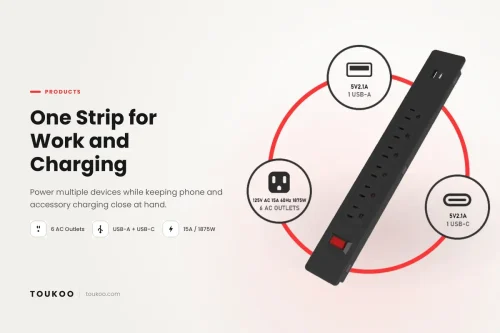
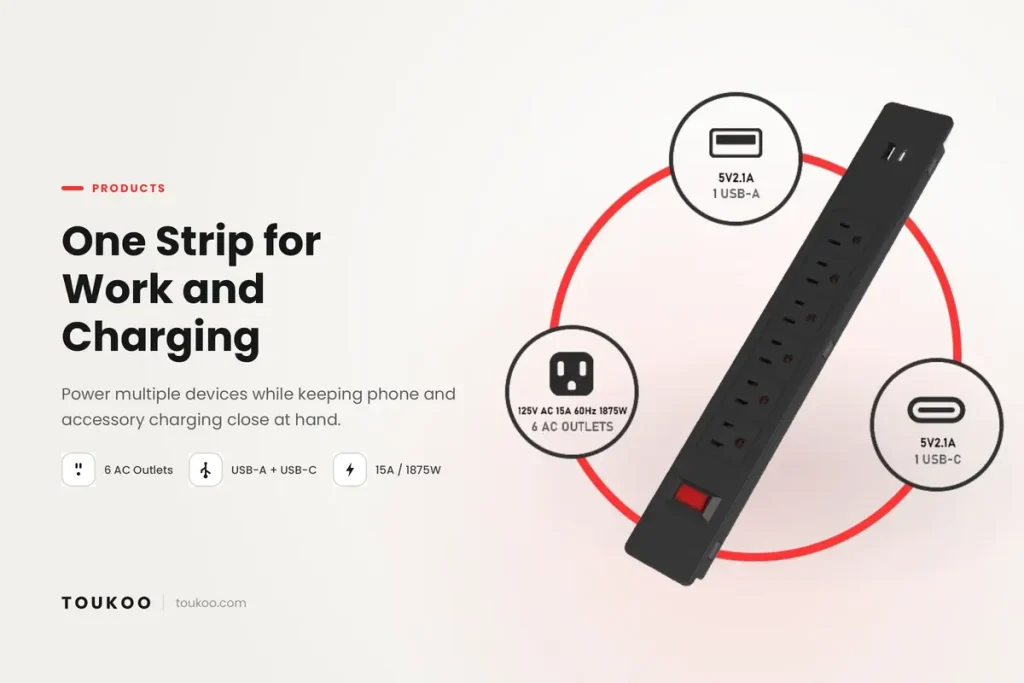
The configuration shown in the TOUKOO product visual includes:
- Six AC outlets for compatible electrical devices
- One USB-A port for compatible USB-powered devices
- One USB-C port for compatible USB-powered devices
- A 15A / 1875W maximum AC power rating
The USB-A and USB-C ports are intended to support everyday charging needs. Users should check the detailed output specifications of the exact model to confirm charging current, supported protocols, and whether any stated output is shared between ports.
It is also important to distinguish between having a USB-C port and supporting USB-C Power Delivery (PD). USB-C describes the connector type; it does not automatically mean that a product supports high-wattage fast charging.
3. A Practical Power Solution for Workspaces
A well-planned power setup can make everyday tasks more convenient. A desktop power strip with multiple outlets and USB charging can be useful in several indoor environments.
Home office: Connect compatible computer equipment and keep USB charging accessible during the workday.
Study desk: Power a monitor, desk lamp, and other suitable devices while charging a phone or another USB-powered accessory.
Shared workstation: Provide a centralized connection point for compatible equipment used by different people throughout the day.
Everyday electronics area: Group suitable low- to moderate-power electronics in one accessible location instead of relying on several separate adapters.
The best arrangement depends on the devices being used, the available space, cable routing, and the product's rated capacity. A power strip should be selected according to the actual electrical requirements of the setup rather than outlet count alone.
4. Understanding the 15A / 1875W AC Rating
The TOUKOO visual identifies the power strip's AC rating as 15A / 1875W. For a product rated at 125V and 15A, 1875W represents the maximum theoretical AC load calculated from voltage multiplied by current.
This rating applies to the combined connected AC load, not to each outlet independently. Connecting six devices does not mean each outlet can supply 1875W. The total demand must remain within the product's stated limits, and the instructions for the specific model should always be followed.
When choosing a power strip, consider the following:
- Check the voltage, current, and wattage requirements of each connected device.
- Avoid exceeding the power strip's total rated load.
- Do not connect one power strip to another to create additional outlets.
- Inspect the cord, plug, and housing for visible damage before use.
- Keep the product dry and use it only in the environments specified by its manufacturer.
- Follow the instructions supplied with the product and the electrical requirements of the destination market.
For additional consumer guidance, review the U.S. Consumer Product Safety Commission's electrical safety guidance for extension cords and power strips. High-power appliances such as portable space heaters should not be connected to a power strip when the appliance manufacturer or safety guidance requires a direct wall connection.
5. What to Look for When Choosing a Power Strip
Not every power strip offers the same combination of features. Before choosing one for a desk, office, or retail product range, consider the following factors.
Outlet quantity and arrangement
Count the devices you expect to connect and consider whether their plugs will fit comfortably beside one another. Larger adapters can occupy more space than standard plugs, so the physical arrangement matters as much as the number of outlets.
USB port types and output
Check whether the product provides USB-A, USB-C, or both. Review the output specifications to understand whether the ports support standard charging or a specific fast-charging protocol. Do not assume that every USB-C port supports USB-C PD.
Electrical rating
Confirm the rated voltage, current, and maximum power. The selected product must match the requirements of the intended market and the equipment being connected.
Cord length and placement
Consider where the power strip will sit and how the cord will reach the wall outlet. Avoid routing cords where they can be pinched, damaged, or become a trip hazard.
Safety features and product documentation
Features such as grounding, overload protection, protective shutters, and surge protection vary by model. Review the official specifications and supporting documentation rather than assuming that every power strip includes every feature.
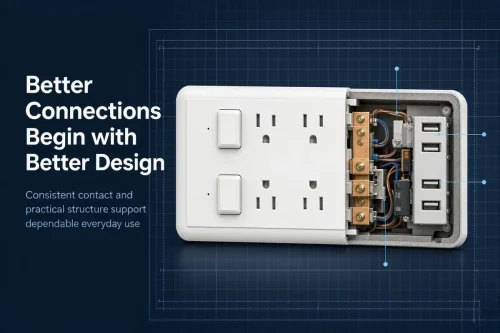
For more detail on the engineering considerations behind a power strip, read Power Strip Internal Design: How Safer Power Is Engineered for Everyday Spaces.
6. Explore TOUKOO Desktop Power Solutions
TOUKOO offers a range of power products for different everyday and workspace applications. Depending on the configuration, buyers can explore options with different outlet counts, USB charging combinations, switching arrangements, and product formats.
If you are comparing desktop power products, browse TOUKOO's Desktop Socket product range to review the listed configurations and identify a product that fits your requirements.
For buyers who need a different outlet arrangement or additional features, it is worth comparing each model's specifications carefully. Outlet quantity, USB output, cord length, dimensions, and safety functions should be confirmed against the exact product before making a selection.
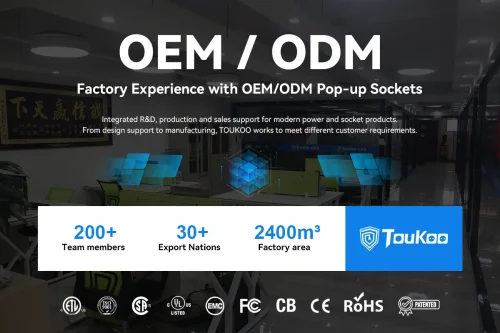
Businesses sourcing products for retail, distribution, or private-label programs can also learn more about TOUKOO's power strip manufacturing and OEM/ODM support. Available options and customization feasibility depend on the product and project requirements.
Choose a Power Strip That Fits Your Setup
A 6 outlet power strip with USB-A and USB-C can provide a practical combination of AC power access and everyday USB charging for compatible devices. The six-outlet configuration supports multi-device setups, while the USB-A and USB-C ports offer additional charging convenience.
The key is to match the product to the real needs of the workspace: confirm the electrical rating, review USB output specifications, plan cable placement, and follow the manufacturer's safety instructions.
To explore product configurations or discuss sourcing requirements, contact TOUKOO about your desktop power needs.
Frequently Asked Questions
What is a 6 outlet power strip used for?
A six-outlet power strip provides several AC connections from one power source. It can be useful for compatible electronics in home offices, study areas, and workspaces, provided the total load remains within the product's rated capacity.
What is the benefit of having both USB-A and USB-C?
USB-A and USB-C support different common connector types. Having both can make it easier to connect compatible USB-powered devices without needing a separate adapter for every connection.
Does a USB-C port always support fast charging?
No. USB-C identifies the connector type, not the charging protocol or power level. Check the exact product specifications to confirm whether USB-C PD or another fast-charging standard is supported.
What does 15A / 1875W mean?
For a 125V, 15A product, 1875W is the maximum AC power rating calculated from voltage and current. It refers to the total connected AC load, not the maximum power available from each outlet separately.
Does every TOUKOO power strip include surge protection?
No single feature should be assumed across an entire product range. Surge protection, overload protection, protective shutters, and other functions vary by model. Check the specifications and documentation for the exact product you intend to purchase or source.